The Head of WordPress goes headless
My job title is Head of WordPress. It was only a matter of time before somebody pointed out that I had never run WordPress headless myself, and the somebody was me.
Oops!… I did it again. In my last post I rebuilt this site over a weekend, without writing code and without opening wp-admin or the hosting panel, just by talking to an agent. I ended it by admitting that I kept adding features long after the site was finished, because each new thing cost me one sentence. I did not stop. This is the next weekend project, and the first one I would call an experiment, not scope creep.
Introduction
What I actually wanted to find out
The question was not whether WordPress can run headless. It can, and has for years. The question was how easy it has become, with an agent doing the work, to build a site with a custom JavaScript frontend on top of WordPress and get it live.
And, more specifically, whether you can take an existing, traditional WordPress site and turn it into one built on a modern frontend stack without migrating anything. No export, no import, no new CMS, no content freeze. The WordPress site stays exactly where it is, with its theme, its plugins and its editors, and the new frontend is built on top of the infrastructure that is already there. If the new frontend turns out not to work, going back should be a single step: the old site never went anywhere.
That is the scenario I care about most, because it is the one most WordPress site owners are actually in. Nobody wants to rebuild a site to try an idea. Everybody would try an idea that can be undone.
You are reading the answer. This site is the outcome of the experiment: the page in front of you was built by the Astro frontend described below, from content stored in the same WordPress site that used to render it.
Headless WordPress, briefly
“Headless” means using WordPress only for what happens behind the scenes: editing, storing content, managing media and users. It stops rendering the pages visitors see. A separate frontend, usually built with a JavaScript framework, fetches the content through an API and turns it into HTML. WordPress keeps the body and loses the head.
None of this is new. The REST API has been part of WordPress core since version 4.7, at the end of 2016. WPGraphQL has been around for almost as long. Frameworks and hosts have been selling headless WordPress for years, and many large publishers run it that way. I have discussed it with customers more times than I can count.
The case for it is well known:
- Freedom on the frontend. Any framework, any design, any interaction, with no theme system to work around.
- Performance. Especially when pages are generated ahead of time and served as static files from a CDN.
- A smaller attack surface. Visitors never reach WordPress; only editors do.
- One backend, many frontends. The same content can feed a website, an app, or a second website, as it turns out.
- One frontend, many sources. The frontend can combine WordPress with other services, such as a dedicated search engine, a headless e-commerce platform, or documents from other systems.
- Separate teams. PHP and JavaScript developers can work, and be maintained, independently.
So is the case against:
- Two systems instead of one. Two codebases, two deployments, two things to host and keep up to date.
- You give up the frontend half of the ecosystem. Themes, the Site Editor and every plugin that prints something on the page (forms, SEO, comments, commerce) stop working out of the box: you rebuild them, or implement a custom integration.
- Editing gets less direct. Previews and “what you see is what you get” need extra work. With static generation, a published change is not live until the site is rebuilt.
- Rich content is a compromise. Whatever editor produced it, the frontend receives finished HTML and has to style it itself; complex layouts need extra work.
- Two skill sets. Maintenance is not necessarily heavier, but it needs both PHP and JavaScript, which suits larger teams or full-stack developers better than one person.
- Cost. A custom frontend is custom software that someone has to build and maintain, and for most sites it has never been worth it.
What headless does not do is make WordPress less important. It stays because of what it is good at as a backend: a simple, flexible data model where adding or changing a field does not put content at risk, a large ecosystem of plugins for the admin side, and an admin and editing experience that millions of people already know.
Why this site was a good candidate
This site ticks almost every box for headless and avoids almost every drawback. It is small, a few dozen pages and posts. The content changes a few times per year, not a few times an hour. There are no forms, no comments, no shop and no plugin that needs to print anything on the page. I am the only editor, and I do not mind waiting a minute for a change to go live.
It also had something most sites do not: a clean content model. In the rebuild the agent had already split the site into a theme that owns the design and a plugin that owns the content, with the CV stored as structured data (roles, employers, dates, certificates), not as formatted text. Content like that can be sent anywhere. The site was headless-ready before I knew I wanted it.
Why AI changes the maths
The strongest argument against headless has always been the last one: cost. Everything headless promises is real, but you pay for it with a custom frontend that someone has to write and keep alive, and a small site rarely justifies that.
That is exactly what AI makes cheap. Describing a frontend and having an agent build it is what people now call vibe coding, and a frontend fed by a well-defined API is where it works best. The agent does not need to understand a theme system, the block editor’s internals, or fifteen years of WordPress conventions. It needs to fetch JSON and render it, which is the most common task in modern web development.
And WordPress is unusually well prepared for it. The REST API has been stable, public and documented for almost ten years. There are countless tutorials, examples and open-source projects built on it, all of which are in the models’ training data. The agent did not have to discover how to read posts from WordPress. It already knew, and so the results were good from the start, as the next section shows.
Look again at two of the drawbacks above: two skill sets, and the cost of a custom frontend. Those are exactly the two things an agent removes. It writes PHP and TypeScript equally happily, and it makes a custom frontend cheap enough to build for one site.
Building process
The tools
Everything was built by Claude Code, Anthropic’s coding agent, from instructions in plain English. The first two versions were built in Claude Code inside the Claude desktop app, on Claude Opus 5; everything after that, from moving to this domain to the audits, ran in Claude Code in the terminal, on Claude Opus 5.5. The agent worked with broad permissions: bypass mode for the first builds, and auto mode later, where a safety classifier approves each action and stops anything risky without waiting for me.
It reached the infrastructure through MCP. Hostinger’s MCP servers, connected through the Hostinger Connector in the desktop app and through Hostinger’s plugin in the terminal, covered the hosting account: websites, files, Node.js builds, WordPress installs and DNS. Inside WordPress, the Hostinger AI plugin exposes the site’s own MCP endpoint, built on WordPress’s Abilities API, which the agent used to read and edit content. Where no tool existed, it called the Hostinger API directly or wrote a small script. Around all that: GitHub for the code and the automatic rebuilds, and headless Chrome, Playwright and Lighthouse for checking its own work.
Three renderings of one site
The idea was simple. Keep the WordPress site exactly as it was, and use it as the content backend for a second site that renders the same pages with a JavaScript framework. Same structure, same words, same photos, different engine. Then do it again with a different framework, to see how much of the result comes from the framework and how much from the content. That gave three versions of the same site:
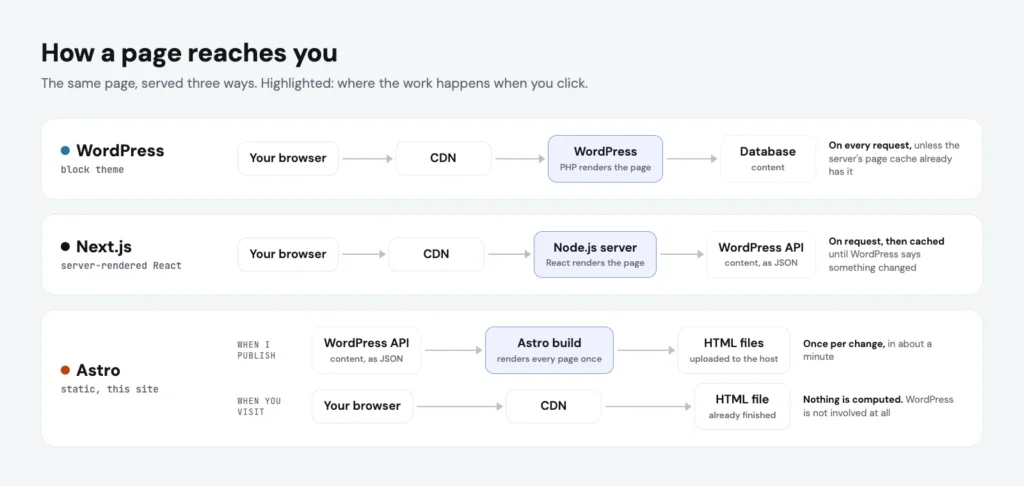
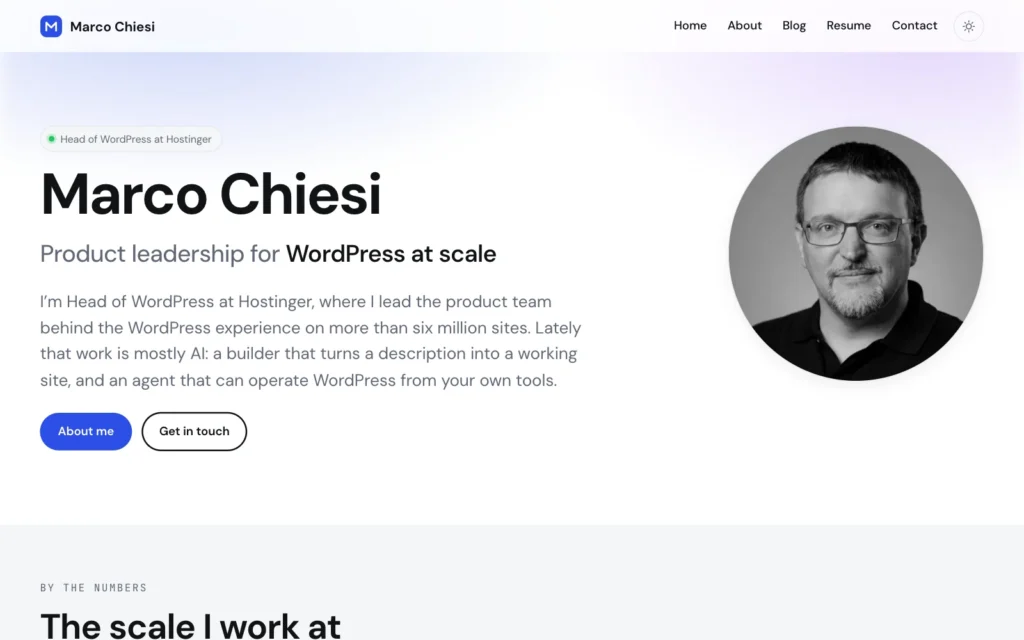
- The WordPress version is the site from my last post: a custom block theme, rendered by WordPress itself, in PHP, every time a page is requested, with the server’s page cache in front.
- The Next.js version is a React application running on its own Node.js server. It also renders every page on request, but from WordPress’s API rather than its database, and keeps the result in a cache until WordPress says something has changed.
- The Astro version renders nothing on request. Every page is built ahead of time into a plain HTML file, with a few small Vue components for the interactive parts. A visitor gets a static file; WordPress is only involved when the site is built. That is the version you are reading.
Each of the two new versions took one prompt. For the Next.js one I asked, in a single message, for a new website on a subdomain with a server-rendered, “vibe coded” Node.js app that replicated this site with WordPress as its backend. There was not even a web space for it yet. Before starting, the agent asked me four multiple-choice questions (which framework, how to read the content from WordPress, how far to move away from the original design, and whether search engines should see it) and I picked its recommendation every time. Then, in one go, it created the website on my hosting account, wrote and deployed the WordPress plugin, built the frontend, deployed it, and checked every page. After just under an hour of work, its reply began with “Live”. I would estimate that 90 per cent of what the Next.js version is today was there from that first answer. Everything after it was iteration: some text a little bigger, a search that listed job roles and certificates alongside pages and posts, a page that did not scroll back to the top.
The Astro version was even simpler, because by then there was something to copy. The whole request was one sentence: rebuild the same site with Astro and static generation, and use Vue wherever a component is needed. No questions this time. Twenty-four minutes later it was live, every route checked, with no changes at all on the WordPress side. I would put that one at 95 per cent right first time: the only correction I asked for was a set of social icons that did not display. Everything since then, which you will read about below, has been iteration: a mix of fixes and additions.
| WordPress version | Next.js version | Astro version | |
|---|---|---|---|
| Rendered by | WordPress, block theme | Next.js 16, React 19 Server Components | Astro 7, with Vue 3 islands |
| When | on each request, cached by the server | on the server, cached until WordPress says otherwise | once, at build time |
| Runs on the server | PHP and MySQL | a Node.js process, plus WordPress | nothing but static files, plus WordPress |
| A published change is live | immediately | within seconds | in about a minute |
| Frontend code | 2,758 lines (block theme) | 3,506 lines + 1,948 in the plugin | 3,590 lines + the same plugin |
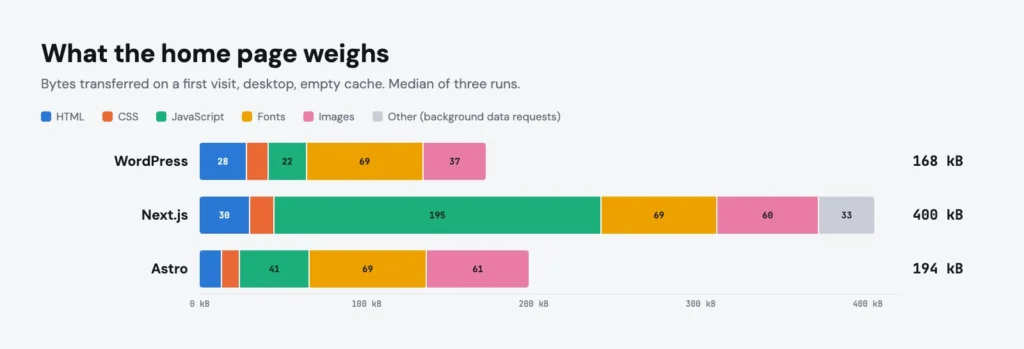
| Home page: total transferred | 168 kB | 400 kB | 194 kB |
| Home page: JavaScript | 22 kB | 195 kB | 41 kB |
| Home page: images | 37 kB | 60 kB | 61 kB |
| Home page: requests | 13 | 27 | 17 |
| Article page: total transferred | 201 kB | 516 kB | 260 kB |
| Time to first byte | 274 ms | 190 ms | 172 ms |
| Dependencies | — | 9 packages | 5 packages |
| Page not found | WordPress’s own 404 page | correct status, but the body arrives in the React payload | a real 404.html |
The page figures were measured in headless Chrome, desktop, with an empty cache, taking the median of three runs. Fonts weigh the same 69 kB everywhere, because all three use the same two files.
Two things surprised me:
- The lightest version is the one I started with. The block theme ships 22 kB of JavaScript and a simpler layout with smaller thumbnails. Headless does not make a page light; having less on it does. Where the static version wins is the server: nothing is computed on request, so it answers first.
- Image optimisation still lives in WordPress. Its standard sizes jump from 300 pixels wide straight to 768, so the wider cards of the JavaScript versions downloaded the large files. One extra 480-pixel size in WordPress halved their home page images without touching either frontend: the frontend decides how big an image is shown, WordPress decides which files exist.
Under the hood, the two headless versions could hardly be more different. Next.js was built for the general case: I asked for server-side rendering, and the agent chose Next.js with React Server Components, the default answer in 2026. It works well and refreshes a page seconds after I save it in WordPress, but it sends nearly five times the JavaScript of the Astro version. Astro was built for this case. I asked for Vue over React where a component is needed, and the agent took that qualifier seriously: the search palette, the lightbox, the mobile menu and the theme toggle are Vue islands, each loaded on its own; the effects that only add a class to finished markup share one 1 kB script; and everything else is rendered at build time and ships no JavaScript at all.
One plugin, two frontends
The most interesting part is on the WordPress side, and it is small. Core’s REST API could have served both frontends as it is, because the CV post types and their fields are already public. The agent still proposed a custom plugin, and it was right to. The reason was shape, not access:
- One request per page. The home page needs page content, three CV collections and the latest posts. Through the standard API that is six round trips; through the custom plugin it is two.
- Structure instead of a blob. The standard API returns a page as one rendered HTML string. A frontend that wants to animate the numbers strip needs to know that part of the page is a numbers strip. So the plugin reads the block tree and the theme’s class names and returns typed segments (hero, metrics, cards, posts, call to action), not 15 kB of markup.
- Grouping on the server. The CV comes back grouped by employer, the way this site shows it, so five roles at one agency read as one tenure on every frontend.
- Telling the frontend when something changed. When a post is saved, the plugin tells the frontend. The Next.js version refreshes the affected pages; the Astro version is rebuilt. It fires and forgets: if the frontend is down, saving a post behaves exactly as it did before the plugin existed.
It adds read-only routes and nothing else. Nothing readable through it is not already public through the standard API, and it does not change how WordPress itself renders the site.
The Astro build needed no changes on the WordPress side at all. It reads the same API as the Next.js one, and the two frontends differ only in how they turn the same JSON into HTML. That is how headless is supposed to work, and it was satisfying to see it hold up on my own content.
What WordPress does for free, rebuilt by hand
The part of headless nobody puts on the slide is how much a traditional WordPress site does without anyone asking, and how much of it disappears the moment WordPress stops rendering the pages. The image lightbox is a good example: core’s lightbox runs on WordPress’s own interactivity scripts, which a headless frontend does not load, so all it inherited was a zoom button that did nothing. The plugin now strips the dead markup and each frontend ships its own lightbox.
The same was true of heading anchors, meta descriptions, canonical URLs and social cards, the sitemap and the RSS feed, search, pagination and category archives, previous and next posts, the 404 page, embedded videos, block layouts such as columns, redirects for retired addresses, robots rules, and the notifications and previews that on a traditional site simply happen when you press Update. Every one of them had to be noticed, then programmed again. None of it was difficult for the agent. All of it was work that a plain WordPress site never needed.
What the headless versions add
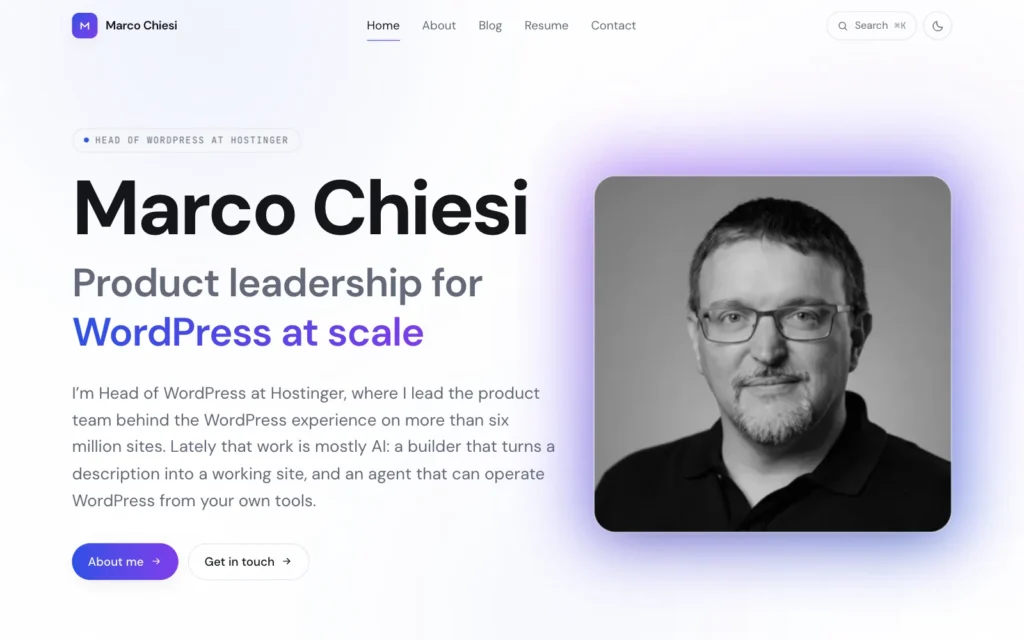
The two headless versions are almost pixel-perfect copies of each other, and close to the original WordPress site: the palette, the light and dark modes and both typefaces come straight from the theme, down to the same two font files. Where they go beyond the WordPress version is in everything a JavaScript framework makes cheap, and this was the fun part:
- A command palette. Press ⌘K, or tap the search icon, and search every page, post, role and certificate as you type. The index ships with the page, so opening it costs no request.
- Cards that morph into articles. On the Astro version, the image and title of a post card fly into the article’s header when you open it, and back again when you return, using the browser’s native view transitions and no extra JavaScript.
- Numbers that count up as they scroll into view, from the real figure that is already in the page, so nothing breaks if the script does not run.
- A living background: a slowly drifting gradient mesh with a touch of film grain, where the WordPress theme has a static glow.
- Cards that light up under the cursor, following the pointer through CSS alone, without re-rendering anything.
- A reading-progress bar, reading times, and tables of contents that follow you down long articles and the résumé.
- Related reading at the end of every post, and a gentle fade as you move between pages.
What broke along the way
The same CSS trap, twice. The bug that trapped the mobile menu in my last post came back on the Next.js site, this time in a page animation, and pushed the zoomed lightbox image 7,000 pixels down the page. The agent had fixed the first one days earlier, and still needed a symptom from me to recognise the second.
A static build can overload its own CMS. The first Astro build asked for all seventeen posts at once, and the shared-hosting server running WordPress answered fourteen of them with an error. The build now asks four at a time and retries. Not glamorous, but it will bite anyone putting a static frontend in front of WordPress on ordinary hosting.
Deploy process
From experiment to live site
The Astro version did not stay an experiment. The rebuilt WordPress site had been living on a temporary domain, while this one is my historical domain. Once the static version was running, it was obvious where it belonged.
So this site is now the Astro build, and WordPress lives on the same domain, in a subfolder. The public sees static pages. Editors log in to WordPress as usual. Anyone else who reaches a page rendered by WordPress is sent to the matching static one, while a logged-in editor still sees WordPress’s own rendering, which doubles as a live preview.
The traditional WordPress site is still running under the hood, theme and all. It simply no longer faces the public: its only job now is to hold the content and feed the build. If you want to compare, a static copy of the WordPress-rendered site, as it was just before it went headless, is in my web archive.
Static generation has one real drawback: the site is a snapshot of WordPress, so an edit does not show up until the site is built again. The plugin takes care of that by starting a rebuild whenever published content changes, and the new version is live about a minute later.
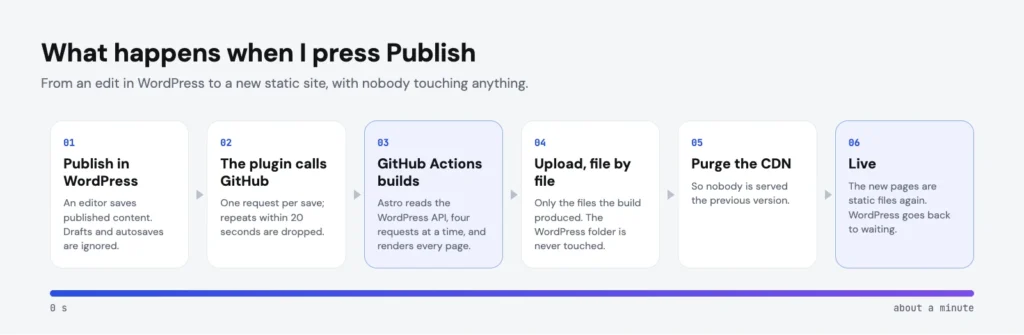
And yes, this time I opened wp-admin, on purpose, twice: once to connect the plugin to GitHub, and once to make a manual edit and check that publishing it really rebuilt the site. That is what an editor does. The building itself was still done entirely by the agent.
Two sites, one domain
The frontend and WordPress can live on one domain or on two, and having been through both, here is how I would weigh them.
One domain is better for the people using the site. It looks and behaves like one product, because it is one: one address, one certificate, no subdomains to set up in DNS, and editors work on the same domain their readers see. Search engines see one site, and cookies, previews and links between the two halves just work.
Two domains are better for the infrastructure. Each half is a standard website that can be deployed, rolled back and cached on its own, with no shared folder and no shared server rules, and the host can build and run the frontend for you. The cost is a second address to manage, and a backend that lives somewhere visibly different from the site.
From a customer’s point of view, one domain wins, so that is what I chose. It was also the hardest part of the whole experiment. Two separate websites are the easy case: each is an ordinary website that the host knows how to deploy. One domain means two very different things sharing one folder, one set of server rules and one address:
- WordPress had to move into a subfolder, and every link it hands out had to have that folder removed, so that the static site could use the same addresses.
- The standard deployment could not be used, because it replaces the whole site folder, WordPress included. The agent wrote a deploy script that uploads the build file by file and refuses to touch the WordPress folder. It never deletes anything.
- One set of server rules for both. The server configuration file had grown to 568 lines, mostly leftovers from long-gone plugins; it is now 77, and a script checked hundreds of old addresses before and after to confirm every one still lands where it did.
- The WordPress login broke. “Cookies are blocked”, it said. The login page set its test cookie on the bare domain while the form posted to the
wwwaddress, so the browser never sent the cookie back. One redirect fixed it.
Three more problems only showed up once it was live, all now fixed: double builds on every save, a deploy that gave up on IPv6, and search-engine “stay away” rules copied over from the experiment.
It worked, but it should not take a custom deploy script to get there.
What the audits found
After the first draft of this article I kept going, as usual, and put the live site through the same checks I would expect on a client site. Most of what came back was, again, something WordPress had been doing quietly:
- SEO. No sitemap, no RSS feed link, social cards that promised a large image without naming one, and an old address that took two redirects. Now there is a sitemap, a feed with the old feed address redirected to it, proper Open Graph tags and single-hop redirects, with 640 old addresses checked and nine more missing ones found and redirected.
- Accessibility. A search button with an icon but no name, faded footer text below the required contrast, and headings that skipped a level. On desktop, in light mode only, the contrast of the ⌘K hint was not compliant; every earlier desktop check had happened to run in dark mode.
- Agentic browsing. Lighthouse now scores how well an AI agent can use a page, and the site started at 0.5 out of 1. The unnamed search button alone was responsible: an agent cannot press a button it cannot name. It is at 1 now, with an
llms.txtfile for good measure. - Security. Strict transport security, a content security policy, and the rest of the usual headers, checked on every page. The video embeds needed an exception.
The result: 100 in every PageSpeed category, performance, accessibility, best practices and SEO, on both mobile and desktop, and an A+ from the security headers check.
Doing this on Hostinger today
Everything in this post runs on Hostinger, and once it is live it runs well. What is not optimal yet is the experience of getting it there. Looking back, these were the gaps:
- Two websites, or custom plumbing. One domain took everything described above.
- The build environment. Old system libraries, production-only installs and a default Node.js version too old for Astro each cost a failed build.
- Builds outside the host. The static site is built on GitHub Actions, wired to WordPress with a plugin and a token.
- Connecting the two halves. API routes, cache invalidation, secrets and editor previews, designed from scratch for one site.
- The way back. Nothing was migrated, but putting the WordPress site back in front of visitors means unpicking the setup by hand. It should be a single click.
None of that was hard for an agent. But it is not something I would ask a customer to set up.
The pattern is clear. The agent was exceptional at building: the frontends, the plugin, the scripts, even the diagnosis of every failure above. Where it struggled, and where I had to step in, was the last mile: getting the application live online, on real infrastructure, in a way that keeps working. AI is very good at writing software. It needs proper tooling to ship it.
Spoiler: that last mile is exactly what we are working on at Hostinger. We are building a dedicated headless solution: full-stack apps, frontend and backend, in one package, with several options for both sides. And yes, WordPress will be one of the available backends. The goal is to close the gaps above, so that the build, the deployment, the connection between the two halves and the way back are handled for you, and the people using it can focus on their idea instead of the technical details of building and deploying it. I cannot say more yet.
Conclusions
So, headless?
For my site, yes, in its static form. The Astro version is light, needs no server process, answers first, and with automatic rebuilds a change is live a minute after I press Publish. WordPress still does everything it is good at: editing, structure, media and users, behind a login.
I would not give the same answer to most WordPress sites. If a site relies on plugins that print things on the page, has several editors who expect to see their changes instantly, or changes all day, the drawbacks are still real. And a well-built block theme is simpler and just as fast, and as the measurements show, it can even be lighter. Headless is a choice about how you want to build and what you want the site to do, not a shortcut to a lighter page.
What has changed is the cost of trying. The most expensive part of headless, the frontend, now takes an afternoon to build. That turns a big architectural decision into an experiment you can run on a weekend. So I did, twice, and I suspect many more people will, most of them people who would never have hired a team for it.
Disclosure, and who wrote this
I work at Hostinger and lead the WordPress products. All of these sites run on my own Hostinger plans, the same ones available to anyone, and were built with an AI coding agent working through the Hostinger API, the WordPress REST API and GitHub. It is a personal project, built in my own time.
As with the last post, the first draft of this article was written by the agent, from the project repositories, our conversations and my notes. I then corrected it, as I did the sites. The words are largely its; the corrections, the opinions and the byline are mine.
Related reading

How I rebuilt my WordPress site without opening WordPress
No code, no wp-admin, no control panel: how my site was built, filled and debugged over a weekend by an agent, and why most of its 1,499 tool calls went on things I did not need.
22 min read

WebMCP in the block editor — WordCamp US 2026 Contributor Day
WordCamp US ran Contributor Day as a hackathon. Five of us spent it teaching the block editor to expose its own actions as WebMCP tools, so an agent can edit a post live in the browser.
5 min read

Building an AI plugin builder for WordPress at CloudFest Hackathon 2026
Three days, eight people from eight countries, and a WordPress plugin that writes WordPress plugins — how the AI-Powered Plugin Builder came together at CloudFest Hackathon 2026, and where it ended up.
5 min read